I thought I would type up a short update with the goings on in the Technology Office, since I have been neglectful in my Technology Tips posts that I usually do on Tuesdays.
Chromebook Mobile Lab - Has been up and functioning. Students really seem to enjoy using them. We had one chromebook that the mousepad started malfunctioning on(it just stopped working, for no real reason....it worked when I set it up, but stopped working VERY early on in the school year)...this has been returned to Samsung, and they will be either repairing or replacing it.
Windows 7 Lab - The Windows 7 lab is also up and running. Keep in mind that the machines in this lab are 4 years old, and have been re-imaged multiple times. So far, the machines that have "had troubles" have been able to start running again. It's VERY Important, that students who use these machines take care of them and shut them down correctly. (2 of the 3 that "had troubles" were NOT shut down correctly)
Broken Screens - We have had our first 4 broken screens of the school year already. One of them was cause by a student dropping their machine. Another was stepped on. The other 2 did not know why their screen broke....but I DO see students often walking around with the screen open on their laptops. This doesn't cause the screen to break...but if they are holding it open by putting pressure on the screen (thumb on the front...hand kind of on the back of the screen), it just makes it possible....the screens aren't very strong.
Broken Screen Repairs- Instead of returning the screens for repairs this year, I have found a business that sends me the appropriate part (replacement screen), and they send it to me and I do the repair here at the school. This is a much more cost efficient solution (screens so far have been $67, in comparison to the $100 to have it repaired).
School Podcast - So far, I have completed 4 podcasts... although haven't done one since Homecoming week. We had a few issues with guests who didn't want to be on the podcast, and/or trouble arranging a time to get an interview. If you have an event or activity coming up that you would like to discuss on the podcast please let me know... It does not take long to put one together, and I really enjoy doing them. I record the interviews on my phone, so no special equipment needed, just some time set aside.
Forticlient/Symantec Issues - earlier in the year we had some issues with some student computers not being able to access sites at home. This was a state issue with the Forticlient software that was installed on the student computers. I believe this issue has been solved. If a student is having trouble getting on a website that they need, they should contact me and I'll see what I can do. Also, if a teacher has a site they need opened up for students...please contact me and I'll work with the DDN and get it opened up.
Colony Computers - I recently completed installing 4 new machines out at Roland Colony. These computers have internet capability (although very restricted), and have Microsoft Office installed on them. I also ordered some external DVD Drives for them, so that they can use some programs that they have on CD ROM. I also need to install the printer on new machines (which I neglected to do when I brought them out there).
Microsoft Surfaces in Lake Benton - The Lake Benton Elementary school just ordered a bunch of Microsoft Surfaces for their "Upper" Elementary grades... they just came in (I think yesterday). So I will be inventorying them, and begin setting them up for their students and staff. With the growth of the Windows 8 Apps, and also Google Apps for Education...it will be interesting to see how they can use these in their classrooms.
Teacher Computer work - Most staff computers have been doing quite well, however there are a few "problem children" out there, that we need to look at replacing their machines. Otherwise, it has mostly been installing programs that are needed on machines. There were a few staff machines that were not functioning well, and they had a bunch of junk programs installed on them...these usually happen as "add-ons" when people are installing other programs on their machines.... for example...one staff member had 4 different toolbars installed on their internet explorer: google, yahoo, ask, and avg!
Office 365 - I did a presentation on Office 365 to the staff a few weeks back on our Wednesday inservice time. As we move forward, I'm continuing to wonder at what a valuable tool this is for our staff and students, and that if the State K12 Data Center is going to continue to provide this service to us... the possiblity of moving to chromebooks for our HS students is more of a possibilty than ever.
Server Power Back-Up - Earlier this fall, we had some problems with our back up power source on our Server. It was just old equipment, and it would "overload" and it would shut down the server. I replaced this and we haven't had any problems since.
Projector Bulbs - We have had a few projector bulbs already go out this fall. When this happens, I have to order a new one...we don't keep them "on hand" as they are very expensive (over $100 for each of them). However, I do have a projector in my office that I can "loan out" while we wait for the new bulb to come in.
I'm sure I'm leaving many things out...but just wanted to "highlight" some of the things I have been doing so far this school year.
Showing posts with label Microsoft Surface. Show all posts
Showing posts with label Microsoft Surface. Show all posts
Wednesday, October 2, 2013

Tuesday, November 27, 2012
Tablets and Chromebooks
Interested in doing a little Christmas shopping? For others in your house, or perhaps yourself?
Getting around to Robbins question... concerning tablets.
I'll come right out and say it, I don't own a tablet, so I'm not an expert on them by any means whatsoever.
However, here is a review from Cnet, which was updated last week, with their "Top 5" Tablets. iPad is at the top of the list, of course. But, I don't think Microsoft's surface was considered in this ranking.
Personally, it really comes down to personal preference. Do you have an iPod? Do like games, and free Apps? Do you have a vast and expansive library of things on your iTunes account? Does using an Apple make you feel superior? Then you should get an iPad.
Do you want to use it to watch movies on long car rides, and listen to music to? You should look into the Kindle Fire HD.
It really does depend on what you want it for? If you are someone like me who is going to use it to check their e-mail and browse the web, the Google Nexus 7 is a fantastic product, at less than half the price of an iPad.
I really like what I've seen and read about the Microsoft surface... looks like a quality competitor to an iPad, but they need to come down in price.
My advice is to Read this article, and make your selection from there. Lots to consider.
Another thought while you are out there shopping.... ever think of a Chromebook?
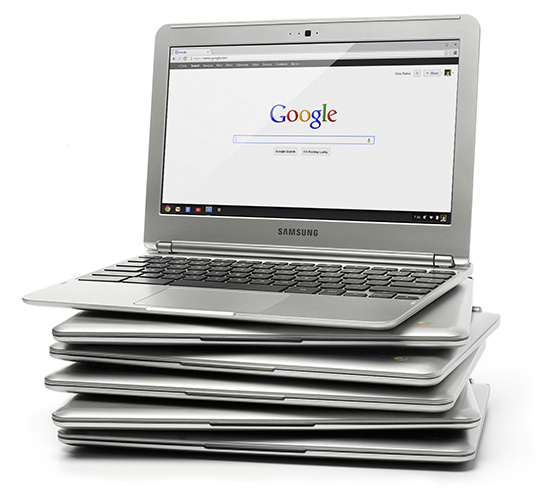
Chromebooks are Google's version of the laptop. And basically, all they are is the chrome browser. Everything you do in the computer (in theory) is done on the web. Want to write a paper... do it in google docs. Want to work with pictures.... Picasa is Google's picture hosting and picture editing software. Basically everything you would do on a normal computer, you do on a chromebook, but it's done online.
They use a solid state drive, so there is no "hard drive". No moving parts! Because of this, it runs cooler, faster, and uses much less battery. Google claims it will run for 8 hours on one charge.
Did I mention it was fast? Google claims that you can boot it up the first time, and be online in less than five minutes.... and once the computer is set up... you can go from powered down and off, to working online in less than 30 seconds.
Google also makes many other numerous claims regarding their chromebooks... such as there is no need to run updates at any time... because it does it automatically. The Chromebook automatically downloads and implements all updates every single time it shuts down.
I actually think they would be a phenomenal classroom tool for the classroom. Having our students use the Chromebooks instead of the netbooks we use now. Here is an article on chromebooks being used successfully in education.
With the price of the "High End" chromebook at $250, and the "lower end" chromebook at $200, this type of computing needs to not only be considered, but looked at and researched closely.
Getting around to Robbins question... concerning tablets.
I'll come right out and say it, I don't own a tablet, so I'm not an expert on them by any means whatsoever.
However, here is a review from Cnet, which was updated last week, with their "Top 5" Tablets. iPad is at the top of the list, of course. But, I don't think Microsoft's surface was considered in this ranking.
Personally, it really comes down to personal preference. Do you have an iPod? Do like games, and free Apps? Do you have a vast and expansive library of things on your iTunes account? Does using an Apple make you feel superior? Then you should get an iPad.
Do you want to use it to watch movies on long car rides, and listen to music to? You should look into the Kindle Fire HD.
It really does depend on what you want it for? If you are someone like me who is going to use it to check their e-mail and browse the web, the Google Nexus 7 is a fantastic product, at less than half the price of an iPad.
I really like what I've seen and read about the Microsoft surface... looks like a quality competitor to an iPad, but they need to come down in price.
My advice is to Read this article, and make your selection from there. Lots to consider.
Another thought while you are out there shopping.... ever think of a Chromebook?
Chromebooks are Google's version of the laptop. And basically, all they are is the chrome browser. Everything you do in the computer (in theory) is done on the web. Want to write a paper... do it in google docs. Want to work with pictures.... Picasa is Google's picture hosting and picture editing software. Basically everything you would do on a normal computer, you do on a chromebook, but it's done online.
They use a solid state drive, so there is no "hard drive". No moving parts! Because of this, it runs cooler, faster, and uses much less battery. Google claims it will run for 8 hours on one charge.
Did I mention it was fast? Google claims that you can boot it up the first time, and be online in less than five minutes.... and once the computer is set up... you can go from powered down and off, to working online in less than 30 seconds.
Google also makes many other numerous claims regarding their chromebooks... such as there is no need to run updates at any time... because it does it automatically. The Chromebook automatically downloads and implements all updates every single time it shuts down.
I actually think they would be a phenomenal classroom tool for the classroom. Having our students use the Chromebooks instead of the netbooks we use now. Here is an article on chromebooks being used successfully in education.
With the price of the "High End" chromebook at $250, and the "lower end" chromebook at $200, this type of computing needs to not only be considered, but looked at and researched closely.
Subscribe to:
Posts (Atom)