Showing posts with label websites. Show all posts

Thursday, March 20, 2014

Office 365 Sharing issues - Integrating Technology Website

I know that previously there has been some sharing issues with office 365 between users with Office 365.  Dan Robbins and I have been in contact with the state about this issue, and this was what we have heard back from them ... (It has been working in Internet Explorer, but not in chrome)... this was the recommendations of the state, that I am copying and pasting below...

Microsoft is switching their product to be named “OneDrive” instead of “SkyDrive” so you’ll see that change across the board.

Since it sounds like the issue is browser-specific  (Chrome) and only one the one computer, you can do the following testing if you’d like:
1)      On the Chrome menu, select Settings.
2)      On the settings page, click Extensions.
3)      Please disable all Extensions (by unchecking the box next to enable)
4)      Exit and restart Chrome
5)      Return to the Extensions page to make sure they are still disabled
6)      Log back in to Office 365, and see if the problem continues to occur.

If everything appears to be working fine in Office 365, you can enable each extension one by one (testing Office 365 after each) to try to figure out if one of them is causing the issue.

So It appears that sharing issues could be related to extensions in the chrome browser?  

Something for you to try anyway, if you are having any sharing issues.

Also, this website was shared among the Tech Director Listserv last week...and I looked at it....and there are ALOT of Technology resources listed on here.  (too many to discuss each individually)... please feel free to check it out.... there is common core stuff on there as well!

http://www.willoughby-eastlake.k12.oh.us/classroom/technology/


Tuesday, January 21, 2014

Tuesday Teacher Tips: Websites and return of the podcasts!

In December, Mr. Erickson, Mrs. Neill, and I, were able to attend a workshop in Sioux Falls hosted by TIE which went over a number of devices and mobile apps that can be used on them.

While there...one of the instructors gave us a link to a google doc page where she had listed over 200 websites (and/or apps) that can be used on mobile devices.

The Link to that spreadsheet is HERE.  My advice would be to look through the list when you are thinking of trying to do something new.  There are many sites on there...some I have discussed here before, and many others that I haven't even heard of.

Secondly, I plan to begin recording some more podcasts in the coming weeks.  The main reason that I stopped, is that the phone that I was using to record the interviews had died (it would no longer charge), and I had a replacement phone that did not have a voice recording option on it.  I recently acquired a different phone that has a voice recorder...so we can pick up where we left off.

So, if you know someone with a coming event, or you have a team or organization that you would like to discuss on the podcast, please let me know.  They are very simple to do, and it does not take a large amount of time.

If you want to listen to any of the previous episodes from this past fall, they are located on the "Podcast Central" page.

Thanks for reading, and check out that spreadsheet...there are alot of good resources on there!

Tuesday, March 19, 2013

Teacher Tidbits: Social Media and Digital Citizenship

Good Tuesday Morning!

Did anyone happen to see who was on the cover of CBS Sports Webpage yesterday?

Nate Wolters on the cover of CBS Sports Webpage
Very Excited to see what the Jackrabbits can do against Michigan on Thursday night.  Hope it's a good game, and may the best team (that night) win.

Today's Topic - Social Media and Digital Citizenship

With the influx and proliferation in Social Media, throughout society, I think it's important as educators (and parents) that we work toward educating our students in "digital citizenship".  

According to Wikipedia a "Digital Citizen" -  commonly refers to a person utilizing information technology (IT) in order to engage in society, politics, and government participation.

So basically, a person who uses the Internet to participate in any number of activities.  Social Media is part of society, and therefore a large part of digital citizenship.  Anyone who participates in the multitude of Social Media outlets, whether it's:  Twitter, Facebook, Pinterest, Google+, LinkedIN, etc, etc...  they are participating in society through the digital media.

There are some great resources out there to help people with their understanding of digital citizenship.  These are things that would be good for everyone to review, but also these are things that would be helpful to teach to our students.  How can we expect them to know, and follow, the expectations of digital citizenship, unless they are taught to them?

Some good Digital Citizenship sites are:

  1. http://www.digitalcitizenship.net/
  2. http://digitalcitizenshiped.com/
  3. http://www.nisd.net/digitalcitizen/
  4. http://www.ciconline.org/DigitalCitizenship
  5. http://www.commonsensemedia.org/advice-for-parents/digital-citizenship

One good idea to keep in mind, in dealing with students and children and their use of the Internet and social media.  Be an ACTIVE participant in their use.  Follow what they are doing.  Check up on their online activity.  Have them show you the sites they go to (use can use the history files for that).  Be Vigilant!  They won't know what's right and/or what's wrong unless they are taught.

Tuesday, February 5, 2013

Tuesday Tidbits: links and discussion?

Last Wednesday at the staff inservice, we spent some time sharing some websites that can be used in the classroom... some are specific to subject area (like math), and some are helpful sites that could be used across the curriculum.

I was able to save all of the links to all the sites on my "Delicious" Social Bookmarking site.  The web address for that is here:  https://delicious.com/mharming .
Social Bookmarking sites like delicious, can be kind of handy!
Delicious itself, is kind of a handy tool, that you can use to keep track of any and all handy links that you want.  Say you are at home, and you find a site you want to use in the classroom... if you start a delicious account you can simply add the link to it...no matter where you are, and you can access all those links anywhere.  Another neat thing about Delicious is that you can "Follow" other people on there... so if you find someone who is an "expert" in your field (Math, Science, elementary, etc...), you can follow their list of helpful links!

Cheryl Harming also discussed edmodo, and the use of edmodo itself in the classroom...it's a pretty handy little tool that you can use to give and receive assignments...give online quizes, give polls, etc, etc... AND, you can invite parents to see what their student is doing in edmodo.  Cheryl did a great job, and hope I was able to chip in with a few drops of knowledge.

We also discussed web site development, and staff worked either in Frontpage or Share Point Designer, in working on their own staff webpage.  Frontpage is the older program, that most people learned on.. but is now obsolete, and we did have problems with a few staff computers using Frontpage.  Share Point Designer is a free download from Microsoft, and seemed to work with all the computers that we tried it on.

Sharepoint Designer looks similar to Frontpage.
As I mentioned, Share Point Designer is a free download... so you can download it to your home computer, and work on your webpage from home.  Note:  For your SD State supplied webpage, you will need to download the 2007 version... NOT the 2010 or 2013 version.

Here is the LINK for 2007 SharePoint Designer Dowload.

Lastly... Wondering if we could get a discussion going here...I'm going to try it, anyway.  My wife and I have just ordered a new computer for our home... the old one was just breaking down...  We ordered an HP with Windows 8 on it.  I have not used Windows 8 yet, but would like to get the reaction(s) from those who have.  I've heard a few negative things about it...but also heard that once you get "used to it" it's no big deal.
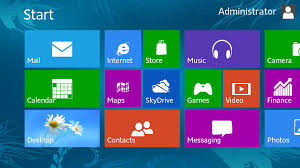
Windows 8 sure looks different!
With the proliferation of "Smart Phones" and tablets... a move to an "App based" Operating System was probably a smart move, in the long term... but it is certainly a significant change from Windows 7.

As far as I know, there aren't any school districts in SD, who are moving their student computers to Windows 8 yet.  Most are sticking with Windows 7, at least for the next year.

Anyway... have a thought on Windows 8?  A complaint?  Praises?  Anything at all?  leave a comment here... I'd like to hear it.

Tuesday, January 29, 2013

Tuesday Technology Tidbits: Couple Websites

Hope everyone has been staying safe on those slippery roads!  It has been quite an interesting few days weather-wise...nice temperatures, but the rain, and/or fog has made for some hazardous traveling conditions.  I know my kids have been dissappointed we didn't have a late start the past 2 days.

Go Elks!


Good Luck tonight to the Elks and the Lady Elks as the take on the Flandreau Indian School in Double Header BB action here in Elkton.

Schedule Notice:  Since I will be working at the "technology training" inservice here in Elkton tomorrow (Wednesday, Jan. 30th), I will make my weekly trip to Lake Benton on Thursday this week.


Sign Up to Follow our Twitter page!


A reminder to sign up to follow the Elkton School Twitter account:  @ElktonSchool .  I try to put announcements and updates on there every week day.  So if you are out and about and can't remember when something school related is coming up...you can use the twitter app on your mobile phone, and check the school's twitter feed.  It's pretty handy.  (I've used it this way already).


Today's Topic:  A couple of interesting Websites

From the site:  

This 21things4students (21t4s) Project was developed to equip students with 21st Century Technology Skills, for success in their education, jobs, and lifelong learning experiences.

21 Things - We selected 21 areas of Web 2.0 tools, all FREE, for your learning and exploration. Each of the areas is called a "Thing" and you can receive a special badge for each thing you complete. Some "Things" have more than one badge, and some have "Gems" for completing advanced levels.

Our Mission - is to provide a fun and project-based experience for you as you build your skills using different Web 2.0 tools available on the Internet.

Basically, this is a really, really neat site for helping kids to develop technology skills.  


From the site:

Takeaway: Wally Bahny suggests five web apps that you can use to hone your IT skills as well as make yourself smarter in other business-related areas.
While IT folks are, of course, some of the smartest people on the planet, even we need to keep our skills sharp. There may even be skills we don’t currently have that might make us more useful or perhaps advance our career. I’ve assembled five web apps (with a bonus sixth selection!) that you can use to hone your IT skills as well as make yourself smarter in other business-related areas.
Although this site is geared more toward IT people (ME), it could certainly be helpful for anyone who has their own computer (and/or wireless network at home).  Sites such as WikiHow and Mind Tools are great resources, and could help anyone with "techno troubles".
So there you go... One site for helping your students develop technology skills, and another site with resources to help you develop some technology skills.  That's what I call a "Win/Win".
Have a great week everyone!