Wednesday, April 17, 2013

Lake Benton: Adding a new printer

Ladies and Gentlemen,

The new office printer is installed!  However, it will need to be installed on each of your individual computers.

Thinking I could "save a few steps" I'm putting the directions in this blog post.

I was able to do this just fine on two lab computers, with the student login...so you should have no trouble.

  1. Click on the Start Button 
  2. Select "Devices and Printers" from the Start Menu
  3. Select "Add a New A Printer" From the top menu
  4. Select "Add a Network Printer"
  5. Select "Ricoh Office" and click the "Next" Button, on the bottom right...
  6. The Computer will start to install the Printer
  7. It will tell you that you've successfully added RICOH Office...CLICK NEXT
  8. It will tell you again that you've successfully added the printer.  Please make sure that the checkmark next to "Set as Default Printer" is checked (if that is what you want as your default printer).  THEN...Click FINISH! 
 
HOO-RAH!  You have successfully installed the new office printer on your computer!
 
If you have any questions or problems with this, please let me know.  I'm only an e-mail or phone call away!  mark.harming@k12.sd.us  


Laugh with Mr. Bean

Since the weather forecast looks horrible again.

Is this really April?  What the heck?
I thought we could use a little humor.

Does anyone remember Mr. Bean?


Have a great Wednesday everbody!

Tuesday, April 16, 2013

Tuesday Teacher Technology Tidbits: April 16th Social Media and Major Events

First item today, is to give a shout out to all the first responders and emergency personnel in Boston for their heroic actions in response to the bombings yesterday at the Boston Marathon.

Every time there is a tragedy like this, I am amazed at the bravery displayed.

The events of yesterday were tragic, and horrifying.  As I was sitting down last night watching the news, I figured that I'd check what people were saying on twitter.  It was amazing.  I pretty much completely ignored the television the rest of the evening, and read the various stories and posts that people had linked to their twitter accounts.

It's such a tremendous change in culture.  Social Media has become almost equal with the television in how people view events.  And amoung younger users, it has probably moved ahead.

Think back 10 years ago, and it seems inconceivable that people would ignore their television screens for their computers or cell phones.  Yet there I was scrolling down my twitter feed on my phone.... looking for new articles, new information, first hand accounts... whatever I could get my hands on.
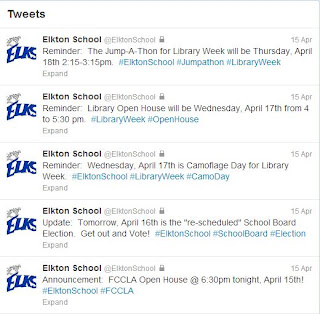
The Elkton School Twitter 'Feed'.

The immediacy and ability to link to first hand accounts, has enabled social media to "leapfrog" the television networks.

I just thought of this, but last weekend I found out that Kobe Bryant injured his achilles on Twitter.  I then clicked on the link to the story (on my phone) and as that page was booting up, I turned on Sportscenter for confirmation.

Just consider that for a second.  The television wasn't the place that I heard the news, the television wasn't the place that I went for information... the television was the place I went for confirmation.

Strange Days indeed.

Imagine what the world will be like in another 10 years, when today's teenagers are in their 20's and have spent their entire formative years with social media (facebook, twitter, etc...) at their fingertips.

For those of you 'resistant' to join social media, I'm not going to tell you that you "HAVE TO" or "NEED TO" sign up for these services, However, I do think it is important for you to realize that this is the culture and world that our students are growing up in.

This is how they relate to each other, how they get news and information, how they communicate.  If you voluntarily are choosing to not participate... well, you are voluntarily choosing to 'close' your ability to understand your students.  That may sound harsh...but it is true.

Monday, April 8, 2013

Wisdom... in Pictures

If you've come by my office, you'll notice I like motivational quotes, sayings, and pictures.

In order to save a little printer ink, here are a few that I really liked, but didn't print off.

I took each and every one of these from my Google+ Feed.

Haters are gonna Hate...and they are everywhere!

I may have posted this earlier this year, but it's still true.

For the runners out there.

Good Advice from Kermit.

I like this one, because it speaks to me.

Let's hear it for Standardized Testing, Everyone!

The Buddha is Wise.


Friday, March 22, 2013

Weekend Update: March 22nd


Well, the dream run for the Jackrabbits Men's basketball team ended last night with a loss to Michigan in the NCAA tournament.  The loss ended the careers of both Nate Wolters and Tony Fiegen.  While it is sad to see their time with the Jackrabbits end, it's important to recognize their accomplishments.  Two straight Conference Tournament Championships, 2 straight NCAA Tournament births, and a school record for most wins in a 2 year period.  They help raised the program up from a difficult transition from Division II athletics.

However, not all is lost in Jackrabbit Land... The Womens Basketball team still has a chance.  They will play in their 5th straight NCAA Tournament tomorrow against South Carolina.  Good Luck to Coach AJ and staff, and the ladies as they look to upset the Gamecocks.

Go Big, Go Blue, Go Jacks!

Elkton will be holding it's annual Prom this weekend, and I certainly hope everyone has an enjoyable time.

Not much else on the weekend agenda, other than watching the NCAA tournament.  Hope everyone has a safe and restful weekend!

With Prom coming up, I thought today's Friday Video should channel something in that vein.

Enjoy OMD's "If You Leave" from the Pretty in Pink soundtrack.


Thursday, March 21, 2013

Go Big, Go Blue, Go Jacks!


NCAA Tournament today!

The odds are against them, they face a very good Michigan team, in Michigan.

6:15 pm tonight on CBS!  Verne Lundquist and the legend Bill Rafftery on the call!

Go Big, Go Blue, Go Jacks!


Tuesday, March 19, 2013

Teacher Tidbits: Social Media and Digital Citizenship

Good Tuesday Morning!

Did anyone happen to see who was on the cover of CBS Sports Webpage yesterday?

Nate Wolters on the cover of CBS Sports Webpage
Very Excited to see what the Jackrabbits can do against Michigan on Thursday night.  Hope it's a good game, and may the best team (that night) win.

Today's Topic - Social Media and Digital Citizenship

With the influx and proliferation in Social Media, throughout society, I think it's important as educators (and parents) that we work toward educating our students in "digital citizenship".  

According to Wikipedia a "Digital Citizen" -  commonly refers to a person utilizing information technology (IT) in order to engage in society, politics, and government participation.

So basically, a person who uses the Internet to participate in any number of activities.  Social Media is part of society, and therefore a large part of digital citizenship.  Anyone who participates in the multitude of Social Media outlets, whether it's:  Twitter, Facebook, Pinterest, Google+, LinkedIN, etc, etc...  they are participating in society through the digital media.

There are some great resources out there to help people with their understanding of digital citizenship.  These are things that would be good for everyone to review, but also these are things that would be helpful to teach to our students.  How can we expect them to know, and follow, the expectations of digital citizenship, unless they are taught to them?

Some good Digital Citizenship sites are:

  1. http://www.digitalcitizenship.net/
  2. http://digitalcitizenshiped.com/
  3. http://www.nisd.net/digitalcitizen/
  4. http://www.ciconline.org/DigitalCitizenship
  5. http://www.commonsensemedia.org/advice-for-parents/digital-citizenship

One good idea to keep in mind, in dealing with students and children and their use of the Internet and social media.  Be an ACTIVE participant in their use.  Follow what they are doing.  Check up on their online activity.  Have them show you the sites they go to (use can use the history files for that).  Be Vigilant!  They won't know what's right and/or what's wrong unless they are taught.