Showing posts with label Infinite Campus. Show all posts

Monday, March 3, 2014

Campus Update: Clear your browsing history.

This past weekend, Infinite Campus, ran an upgrade and to be able to log in and use the "new" version of the website, they have asked that users clear their browsing history and cookies.

I have helped a few staff members do this already this morning, but just in case you haven't done it yet, and you would like to do it yourself (It's not difficult), I thought I would lay out the steps needed in this blog post.

 I am going to show the steps in google chrome.  The chrome browser seems to be working with this update.  I had a teacher try Internet explorer earlier, and it wouldn't work...we tried chrome, and were successful.  However, there is a similar procedure for Internet explorer.

#1  Go click on the menu button (top right of your screen) in the chrome browser.

The Little Box with the 3 Horizontal lines is the menu button
 #2 Go down the drop down list, and select "Settings".  This should bring up the Settings in a separate tab.

#3 On the top left of the page, select the History button.


#4 Near the top, on the main page click the "Clear Browsing Data" button.  This will bring up a "pop up" window for clearing your browser data.


#5 In that window, select the drop down for 'Obliterate the following items from:' and select the option 'the beginning of time'.
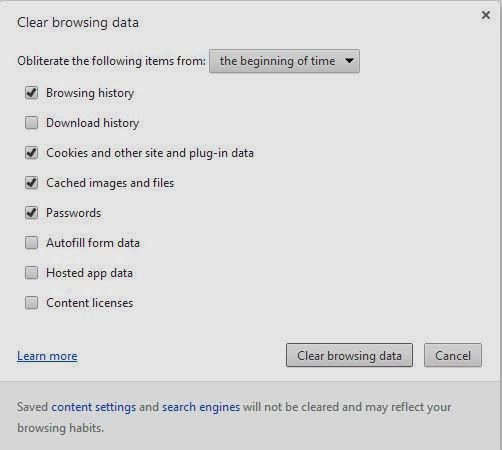


#6 Ensure that the following items are checked: 'Browsing history' and 'Cookies and other site and plug in data'.  (NOTE:  You can choose to select and delete other items such as: downloads, passwords, etc... but you don't need to.  The only ones that NEED to be selected are History and Cookies)

#7 Click the button that says 'Clear browsing data'.  You will probably need to wait a minute or so until the data is cleared from the machine.

 And that is all you need to do!  Your history and cookies are cleaned up, and you should be able to successfully run the "new" version of Infinite Campus now.

If you continue to have problems, please don't hesitate to contact me, and I will endeavor to get you back going again.

Tuesday, May 14, 2013

Tuesday Tidbits: IE and IC not 'playing nice'

Hi everyone!  Hope your Tuesday is going well!

Lately, I've been getting a number of teachers who are having trouble saving their assignments in Infinite Campus.  They put the assignment in, and the details, and the points and everything else, and then they click "Save" and.... nothing.

A few months ago.... there was a message that came across the Tech Director Listserv that addressed this problem, and while no one had a real solution.  Several people mentioned that they were having similar problems.

It was also discovered that this problem was limited to Internet Explorer.  If a staff member had Google Chrome or Mozilla Firefox installed, Infinite Campus worked fine.

About a month ago (give or take a week or two)... Mrs. Hemmen was our first staff member to go through this.  We couldn't get Internet Explorer to work no matter what, so I installed Google Chrome on hers and away we went.

A few weeks ago, I e-mailed the Tech Guy who had started the question and asked if he ever got an answer.  He said he did not, and that he just installed Chrome whenever someone had a problem.

Today, I helped a couple other teachers with this... and decided to send my own message over the Listserv. The answer.... "It's an Internet Explorer problem".  One tech person said they talked to Campus and they(Campus) claimed that Firefox and Chrome were fully supported, but Internet Explorer not so much.

So.... You have 2 options

1.  Have me install  Google Chrome on your computer.  You can use it to basically "replace" Internet Explorer if you like (it is faster).  Note:  I use Chrome almost exlusively at home and at work.  It's faster, more secure, and it works better with more websites.  I plan on installing the Chrome browser on all computers in the school next year.

Or, if you don't want to mess with it that much... just use Chrome for running Campus, and keep your IE for your other bookmarks.

2.  I can teach you a "Work Around" in which you can add assignments through the gradebook itself.  It works just fine...it's just a different way to enter the information.

One of Microsoft's current "updates" is "Internet Explorer 10" and it's causing lots of trouble across the web.  So, if you would like to have Chrome installed...just give me a holler...it only takes a few minutes, and you'll be good to go.

Eventually, I imagine that Campus will solve their compatability issues...but for now, we will have to go with another option!

Lastly.... have you ever heard of Jake Bugg?  I subscribe to Rolling Stone magazine, and I read an article that compared him to Bob Dylan.

So I was intrigued...and he's pretty darn good!  Enjoy Lightning Bolt...


Friday, August 3, 2012

Friday, August 3rd

In the office again today.

Hoping to finish some teacher laptops this morning.

Next week the plan is to get the teacher nettops running, and order some more equipment for the touchscreen setups.  Once all the orders are completed, and the equipment has arrived, we will begin installing.  Still hoping to get them up and running by the start of school, but if that doesn't happen it won't be long after the start of school.  The major holdup has been getting the correct projector to make the system work.  We have ordered two different ones that weren't capable of doing what we wanted.

I'm also working on Infinite Campus, learning how to get people logins and etc.

Hope everyone has a great weekend, I'll be heading back to the River City, and back in Elkton on Monday.

For the Friday video this week, let's go with something upbeat, enjoy Katrina and the Waves.